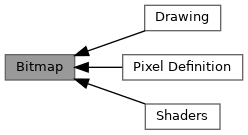
Topics | |
| Drawing | |
| Pixel Definition | |
| Shaders | |
Typedefs | |
| typedef enum bj_blit_op | bj_blit_op |
Enumerations | |
| enum | bj_blit_op { BJ_BLIT_OP_COPY = 0 , BJ_BLIT_OP_XOR , BJ_BLIT_OP_OR , BJ_BLIT_OP_AND , BJ_BLIT_OP_ADD_SAT , BJ_BLIT_OP_SUB_SAT } |
| enum | bj_bitmap_color_role { BJ_BITMAP_CLEAR_COLOR = (1 << 0) , BJ_BITMAP_COLORKEY = (1 << 1) } |
| enum | bj_mask_bg_mode { BJ_MASK_BG_TRANSPARENT = 0 , BJ_MASK_BG_OPAQUE , BJ_MASK_BG_REV_TRANSPARENT } |
| enum | bj_text_halign { BJ_TEXT_HALIGN_LEFT , BJ_TEXT_HALIGN_CENTER , BJ_TEXT_HALIGN_RIGHT } |
| enum | bj_text_valign { BJ_TEXT_VALIGN_TOP , BJ_TEXT_VALIGN_CENTER , BJ_TEXT_VALIGN_BOTTOM } |
Functions | |
| struct bj_bitmap * | bj_allocate_bitmap (void) |
| struct bj_bitmap * | bj_create_bitmap (size_t width, size_t height, enum bj_pixel_mode mode, size_t stride) |
| void | bj_destroy_bitmap (struct bj_bitmap *bitmap) |
| struct bj_bitmap * | bj_create_bitmap_from_file (const char *path, struct bj_error **error) |
| struct bj_bitmap * | bj_create_bitmap_from_pixels (void *pixels, size_t width, size_t height, enum bj_pixel_mode mode, size_t stride) |
| struct bj_bitmap * | bj_copy_bitmap (const struct bj_bitmap *bitmap) |
| struct bj_bitmap * | bj_convert_bitmap (const struct bj_bitmap *bitmap, enum bj_pixel_mode mode) |
| struct bj_bitmap * | bj_init_bitmap (struct bj_bitmap *bitmap, void *pixels, size_t width, size_t height, enum bj_pixel_mode mode, size_t stride) |
| void | bj_assign_bitmap (struct bj_bitmap *bitmap, void *pixels, size_t width, size_t height, enum bj_pixel_mode mode, size_t stride) |
| void | bj_reset_bitmap (struct bj_bitmap *bitmap) |
| void * | bj_bitmap_pixels (struct bj_bitmap *bitmap) |
| size_t | bj_bitmap_width (const struct bj_bitmap *bitmap) |
| size_t | bj_bitmap_height (const struct bj_bitmap *bitmap) |
| int | bj_bitmap_mode (struct bj_bitmap *bitmap) |
| size_t | bj_bitmap_stride (struct bj_bitmap *bitmap) |
| void | bj_make_bitmap_rgb (const struct bj_bitmap *bitmap, size_t x, size_t y, uint8_t *red, uint8_t *green, uint8_t *blue) |
| uint32_t | bj_make_bitmap_pixel (struct bj_bitmap *bitmap, uint8_t red, uint8_t green, uint8_t blue) |
| void | bj_put_pixel (struct bj_bitmap *bitmap, size_t x, size_t y, uint32_t value) |
| void | bj_clear_bitmap (struct bj_bitmap *bitmap) |
| void | bj_set_bitmap_color (struct bj_bitmap *bitmap, uint32_t color, uint8_t roles) |
| void | bj_enable_colorkey (struct bj_bitmap *bitmap, bj_bool enabled) |
| uint32_t | bj_bitmap_pixel (const struct bj_bitmap *bitmap, size_t x, size_t y) |
| bj_bool | bj_blit (const struct bj_bitmap *src, const struct bj_rect *src_area, struct bj_bitmap *dst, const struct bj_rect *dst_area, enum bj_blit_op op) |
| bj_bool | bj_blit_stretched (const struct bj_bitmap *src, const struct bj_rect *src_area, struct bj_bitmap *dst, const struct bj_rect *dst_area, enum bj_blit_op op) |
| bj_bool | bj_blit_mask (const struct bj_bitmap *mask, const struct bj_rect *mask_area, struct bj_bitmap *dst, const struct bj_rect *dst_area, uint32_t fg_native, uint32_t bg_native, bj_mask_bg_mode mode) |
| bj_bool | bj_blit_mask_stretched (const struct bj_bitmap *mask, const struct bj_rect *mask_area, struct bj_bitmap *dst, const struct bj_rect *dst_area, uint32_t fg_native, uint32_t bg_native, bj_mask_bg_mode mode) |
| unsigned | bj_measure_text (const char *text, unsigned height) |
| void | bj_draw_text (struct bj_bitmap *dst, unsigned height, struct bj_rect area, bj_text_halign halign, bj_text_valign valign, uint32_t fg_native, const char *text) |
| void | bj_draw_textf (struct bj_bitmap *dst, unsigned height, struct bj_rect area, bj_text_halign halign, bj_text_valign valign, uint32_t fg_native, const char *fmt,...) |
| void | bj_blit_text (struct bj_bitmap *dst, unsigned height, struct bj_rect area, bj_text_halign halign, bj_text_valign valign, uint32_t fg_native, uint32_t bg_native, bj_mask_bg_mode mode, const char *text) |
Detailed Description
Pictures in memory: load them, draw into them, copy them onto each other.
A bitmap is a rectangle of pixels stored in your program's memory. Banjo represents it as bj_bitmap, which carries the width and height of the rectangle, the format of each pixel (how many bits, which channel is red, etc.; see Pixel Definition), and the actual bytes. You use bitmaps for two related things: holding images loaded from disk (sprites, backgrounds, fonts), and as the framebuffer: the picture-in-memory your draw callback writes into before banjo presents it to the window.
Where bitmaps come from
- bj_create_bitmap allocates a blank bitmap of a given size and format.
- bj_create_bitmap_from_file loads a BMP file from disk into a new bitmap.
bj_render_target_bitmapreturns the window's framebuffer from inside a draw callback.
In all cases you eventually release them with bj_destroy_bitmap (except the framebuffer, which the window owns).
"Blit": copy a rectangle of pixels from one bitmap to another
"Blit" is short for BLock Image Transfer, and it means: take some pixels from one bitmap (the source) and put them into another (the destination). It's the fundamental operation for composing scenes: putting a sprite on a background, drawing a tile from a tile sheet, putting text on the screen.
Banjo offers four flavours, all the same idea with one extra twist each:
- bj_blit - straight rectangle-to-rectangle copy, source and destination same size.
- bj_blit_stretched - same but the destination rectangle can be a different size; the source is scaled to fit.
- bj_blit_mask - copy only some pixels, using a chosen "transparent" colour in the source that's skipped (the classic sprite trick: set the background pixels of a sprite to magenta and they vanish when you blit).
- bj_blit_mask_stretched - both at once.
Plus bj_draw_text and bj_blit_text for text rendering using Banjo's built-in 8×8 font, and Drawing for filled shapes (lines, circles, rectangles, triangles).
A note on colour values
Different bitmaps can store pixels in different formats (24-bit RGB, 16-bit packed, 8-bit indexed palette, …). A hard-coded 0x00FF0000 "red" only means red in 32-bit RGB; in other formats it's something else entirely. So Banjo's drawing functions take pre-packed uint32_t values, and you build them with bj_make_bitmap_pixel which asks the bitmap to pack (R, G, B) triples into its own native format. That way the same drawing code works whatever the destination format is.
- See also
- Pixel Definition for the pixel-format encoding, Drawing for shapes (lines, circles, rectangles, …), Bitmap for getting a window's framebuffer.
Typedef Documentation
◆ bj_blit_op
| typedef enum bj_blit_op bj_blit_op |
Enumeration Type Documentation
◆ bj_bitmap_color_role
| enum bj_bitmap_color_role |
Colour roles for bitmaps.
These flags specify which colour properties of a bitmap should be affected when calling bj_set_bitmap_color. Multiple roles can be combined using bitwise OR.
- Typical Usage
- BJ_BITMAP_CLEAR_COLOR: Sets the colour used by bj_clear_bitmap.
- BJ_BITMAP_COLORKEY: Sets the transparency key and enables colour keying.
- Both flags together: Common when initialising sprite sheets with a transparent background colour.
| Enumerator | |
|---|---|
| BJ_BITMAP_CLEAR_COLOR | Clear/fill colour for bj_clear_bitmap() |
| BJ_BITMAP_COLORKEY | Transparency key for blitting (auto-enables) |
◆ bj_blit_op
| enum bj_blit_op |
Raster operation (ROP) to apply during blitting.
These operations define how source pixels combine with destination pixels during bj_blit and bj_blit_stretched. Some operations are optimised on specific formats (e.g., 32bpp).
- Note
- For mismatched pixel formats, colours are combined in linear integer RGB (8-bit per channel) after conversion from/to native formats.
◆ bj_mask_bg_mode
| enum bj_mask_bg_mode |
Mask background mode for masked blits (glyph/text rendering).
- Modes
- BJ_MASK_BG_TRANSPARENT: Only the foreground is drawn where the mask coverage > 0. Destination pixels outside the mask are preserved (no background fill).
- BJ_MASK_BG_OPAQUE: The entire destination rectangle is written as a blend between the background colour (where mask coverage is 0) and the foreground colour (where mask coverage is 255), with linear interpolation for values in between.
- BJ_MASK_BG_REV_TRANSPARENT: Carved mode. The background colour is composited where the mask coverage is outside the glyph (i.e., with alpha = 1 - coverage). Pixels inside the glyph (coverage=255) keep the destination value, effectively cutting the text out of the background.
◆ bj_text_halign
| enum bj_text_halign |
◆ bj_text_valign
| enum bj_text_valign |
Function Documentation
◆ bj_allocate_bitmap()
| struct bj_bitmap * bj_allocate_bitmap | ( | void | ) |
Allocate a new bitmap object.
- Returns
- A new bj_bitmap instance
◆ bj_assign_bitmap()
| void bj_assign_bitmap | ( | struct bj_bitmap * | bitmap, |
| void * | pixels, | ||
| size_t | width, | ||
| size_t | height, | ||
| enum bj_pixel_mode | mode, | ||
| size_t | stride ) |
◆ bj_bitmap_height()
| size_t bj_bitmap_height | ( | const struct bj_bitmap * | bitmap | ) |
Get the height of the given bitmap.
- Parameters
-
bitmap The bitmap object.
- Returns
- The bitmap height as number of pixels.
- Examples
- load_bmp.c.
Referenced by setup().
◆ bj_bitmap_mode()
| int bj_bitmap_mode | ( | struct bj_bitmap * | bitmap | ) |
Get the pixel mode of the given bitmap.
- Parameters
-
bitmap The bitmap object.
- Returns
- The bitmap pixel mode.
- Examples
- random_distribution.c.
Referenced by darken_color().
◆ bj_bitmap_pixel()
| uint32_t bj_bitmap_pixel | ( | const struct bj_bitmap * | bitmap, |
| size_t | x, | ||
| size_t | y ) |
Gets the colour of a bitmap pixel, given its coordinates.
- Parameters
-
bitmap The bitmap object. x The X coordinate of the pixel. y The Y coordinate of the pixel.
- Returns
- The colour at (x, y).
- Memory Safety
This function does not perform any bound checking on the pixel coordinates. It is up to you to ensure the coordinates lie between [0, struct bj_bitmap->width * struct bj_bitmap->height]. Writing outside of these bounds will result in undefined behaviour or corrupted memory access.
◆ bj_bitmap_pixels()
| void * bj_bitmap_pixels | ( | struct bj_bitmap * | bitmap | ) |
Get the underlying pixels data for direct access.
- Parameters
-
bitmap The bitmap object.
- Returns
- The buffer data.
◆ bj_bitmap_stride()
| size_t bj_bitmap_stride | ( | struct bj_bitmap * | bitmap | ) |
Get the number of bytes in a row of pixel data, including the padding.
- Parameters
-
bitmap The bitmap object.
- Returns
- The bitmap stride
◆ bj_bitmap_width()
| size_t bj_bitmap_width | ( | const struct bj_bitmap * | bitmap | ) |
Get the width of the given bitmap.
- Parameters
-
bitmap The bitmap object.
- Returns
- The bitmap width as number of pixels.
- Examples
- load_bmp.c.
Referenced by setup().
◆ bj_blit()
| bj_bool bj_blit | ( | const struct bj_bitmap * | src, |
| const struct bj_rect * | src_area, | ||
| struct bj_bitmap * | dst, | ||
| const struct bj_rect * | dst_area, | ||
| enum bj_blit_op | op ) |
Bitmap blitting operation from a source to a destination bitmap.
- Parameters
-
src The source bitmap. src_area Optional area to copy from in the source bitmap (0 = full source). dst The destination bitmap. dst_area Optional area to copy to in the destination bitmap (0 = same size at {0,0}). op The raster operation to apply (see bj_blit_op).
- Returns
- BJ_TRUE if a blit actually happened, BJ_FALSE otherwise.
If src_area is 0, the entire source is copied. If dst_area is 0, the destination area defaults to {.x=0,.y=0,.w=src_area.w,.h=src_area.h}.
- Clipping
The blit is automatically clipped to the destination bounds. If clipping occurs, the source area is adjusted accordingly to preserve pixel mapping.
- Colour Key
If the source bitmap has colour keying enabled via bj_set_bitmap_color, any source pixel equal to the key value is skipped.
- Pixel Formats
- If src->mode == dst->mode and op == BJ_BLIT_OP_COPY, a fast path is used.
- Otherwise, pixels are converted via RGB and the ROP is applied per channel.
- Limitations
Sub-byte formats (1/4/8bpp) are supported but may be slower due to bit packing.
- Examples
- bitmap_blit.c, bitmap_blit_colorkey.c, and sprite_animation.c.
Referenced by on_draw(), on_draw(), on_draw(), setup(), and setup().
◆ bj_blit_mask()
| bj_bool bj_blit_mask | ( | const struct bj_bitmap * | mask, |
| const struct bj_rect * | mask_area, | ||
| struct bj_bitmap * | dst, | ||
| const struct bj_rect * | dst_area, | ||
| uint32_t | fg_native, | ||
| uint32_t | bg_native, | ||
| bj_mask_bg_mode | mode ) |
Masked blit (non-stretched).
The mask must be 8bpp (coverage 0..255).
- Parameters
-
mask The 8bpp mask bitmap (0 = fully transparent, 255 = fully opaque). mask_area Optional area in the mask to use (0 = full mask). dst The destination bitmap. dst_area Optional destination area (0 = place at {0,0} with mask_area size). fg_native Foreground colour packed in the destination's native format. bg_native Background colour packed in the destination's native format. mode The background mode (see bj_mask_bg_mode).
- Returns
- BJ_TRUE if any pixel was written, BJ_FALSE otherwise.
- Behaviour
- For BJ_MASK_BG_TRANSPARENT, foreground is source-over composited onto destination wherever the mask is non-zero.
- For BJ_MASK_BG_OPAQUE, each pixel in the dest area is mix(bg, fg, mask).
- For BJ_MASK_BG_REV_TRANSPARENT, the background is composited with alpha (1 - mask) and glyph interiors are left untouched.
- Pixel Formats
The mask must be 8 bits per pixel. Destination can be any supported pixel mode; colours must be provided in destination-native format (see bj_make_bitmap_pixel).
- Clipping
The destination area is clipped to the destination bounds. The mask area is clipped to the mask bounds. Both rectangles must have identical sizes.
◆ bj_blit_mask_stretched()
| bj_bool bj_blit_mask_stretched | ( | const struct bj_bitmap * | mask, |
| const struct bj_rect * | mask_area, | ||
| struct bj_bitmap * | dst, | ||
| const struct bj_rect * | dst_area, | ||
| uint32_t | fg_native, | ||
| uint32_t | bg_native, | ||
| bj_mask_bg_mode | mode ) |
Masked blit with stretching (nearest neighbor).
The mask must be 8bpp.
- Parameters
-
mask The 8bpp mask bitmap (0..255 coverage). mask_area Optional area in the mask (0 = full mask). dst The destination bitmap. dst_area Optional destination area (0 = full destination). fg_native Foreground colour packed for destination. bg_native Background colour packed for destination. mode The background mode (see bj_mask_bg_mode).
- Returns
- BJ_TRUE if any pixel was written, BJ_FALSE otherwise.
- Clipping & Mapping
The destination area is clipped to the destination bounds. The source mask area is proportionally adjusted so that the visible sub-rectangle of the stretched glyph corresponds to the same sub-rectangle of the source. This avoids visual “wrap-around” artifacts when partially off-screen.
- Coverage
Mask values are interpreted as linear coverage (0..255). Alpha blending uses integer arithmetic: mix(dst, src, a) → (dst*(255-a) + src*a)/255.
◆ bj_blit_stretched()
| bj_bool bj_blit_stretched | ( | const struct bj_bitmap * | src, |
| const struct bj_rect * | src_area, | ||
| struct bj_bitmap * | dst, | ||
| const struct bj_rect * | dst_area, | ||
| enum bj_blit_op | op ) |
Stretched bitmap blitting (nearest neighbor).
- Parameters
-
src The source bitmap. src_area Optional area to copy from in the source bitmap (0 = full source). dst The destination bitmap. dst_area Optional area to copy to in the destination bitmap (0 = full destination). op The raster operation to apply (see bj_blit_op).
- Returns
- BJ_TRUE if a blit actually happened, BJ_FALSE otherwise.
If source and destination rectangles have the same size, this function delegates to bj_blit and uses the same fast paths.
- Clipping
The destination rectangle is clipped to the destination bounds, and the source rectangle is proportionally adjusted to ensure visual consistency.
- Colour Key
Colour keying on the source bitmap is honored (see bj_set_bitmap_color).
- Examples
- bitmap_blit_colorkey.c, drawing_2d.c, load_bmp.c, and sprite_animation.c.
◆ bj_blit_text()
| void bj_blit_text | ( | struct bj_bitmap * | dst, |
| unsigned | height, | ||
| struct bj_rect | area, | ||
| bj_text_halign | halign, | ||
| bj_text_valign | valign, | ||
| uint32_t | fg_native, | ||
| uint32_t | bg_native, | ||
| bj_mask_bg_mode | mode, | ||
| const char * | text ) |
Prints text with explicit foreground/background and background mode.
- Parameters
-
dst The destination bitmap. height Target font height in pixels. area Target area for text placement and alignment. halign Horizontal alignment within the area. valign Vertical alignment within the area. fg_native Foreground colour in destination-native format. bg_native Background colour in destination-native format. mode Background mode (see bj_mask_bg_mode). text UTF-8/ASCII string with optional ANSI SGR sequences.
- ANSI Colour Formatting
The string may embed standard SGR sequences following ‘ESC ’['`:
- Reset
- \x1B[0m Reset both foreground and background to the defaults passed as fg_native/bg_native.
- Basic / Bright colours
- Foreground: \x1B[30..37m (basic), \x1B[90..97m (bright)
- Background: \x1B[40..47m (basic), \x1B[100..107m (bright)
- Defaults
- \x1B[39m Reset foreground to the call's fg_native.
- \x1B[49m Reset background to the call's bg_native.
- Truecolor
- Foreground: \x1B[38;2;R;G;Bm
- Background: \x1B[48;2;R;G;Bm
Unsupported or malformed sequences are ignored gracefully.
- Background Modes
- BJ_MASK_BG_TRANSPARENT: foreground is composited where glyph coverage > 0.
- BJ_MASK_BG_OPAQUE: the glyph box is a band: mix(bg, fg, coverage).
- BJ_MASK_BG_REV_TRANSPARENT: carved-out mode where background is painted with alpha = (1 - coverage) and glyph interiors remain untouched.
- Clipping
Each glyph is pre-clipped to the destination bounds. The source mask sub-rectangle is adjusted proportionally so edge glyphs render correctly without wrap-around artifacts.
- Performance
The glyph mask atlas is cached per destination bitmap. Rendering uses nearest-neighbor scaling and an inner loop with integer blending.
- Examples
- drawing_text.c.
Referenced by draw().
◆ bj_clear_bitmap()
| void bj_clear_bitmap | ( | struct bj_bitmap * | bitmap | ) |
Fills the entire bitmap with the clear colour.
- Parameters
-
bitmap The bitmap object to reset.
The clear colour can be set with bj_set_bitmap_color using the BJ_BITMAP_CLEAR_COLOR role. This function effectively fills all the pixels of the bitmap with the clear colour.
- Examples
- bitmap_blit.c, drawing_2d.c, interpolation.c, physics_kinematics.c, physics_particle.c, pong.c, random_distribution.c, sprite_animation.c, and start.c.
Referenced by draw(), draw(), draw(), draw(), on_draw(), on_draw(), setup(), and setup().
◆ bj_convert_bitmap()
| struct bj_bitmap * bj_convert_bitmap | ( | const struct bj_bitmap * | bitmap, |
| enum bj_pixel_mode | mode ) |
Creates a new struct bj_bitmap by converting bitmap.
- Parameters
-
bitmap The source bitmap. mode The new pixel mode.
- Returns
- A pointer to the newly created struct bj_bitmap object.
The new bitmap is provided by creating a new empty bitmap matching source's width and height, but using mode as pixel mode. The pixels are then converted to fill-in the new buffer.
- Behaviour
Returns bj_copy_bitmap(bitmap) if mode == bj_bitmap_mode(bitmap).
Returns 0 if mode is BJ_PIXEL_MODE_UNKNOWN or an unsupported value.
- Memory Management
The caller is responsible from releasing the bitmap using bj_destroy_bitmap.
If bitmap was initially created using bj_create_bitmap_from_pixels, the "weak" property of the bitmap is not maintained in the new bitmap and the caller is not responsible for manually releasing its pixel data.
◆ bj_copy_bitmap()
Creates a new struct bj_bitmap by copying bitmap.
- Parameters
-
bitmap The source bitmap.
- Returns
- A pointer to the newly created struct bj_bitmap object.
The new bitmap will have exactly the same properties than the source bitmap.
- Memory Management
The caller is responsible from releasing the bitmap using bj_destroy_bitmap.
If p_source was initially created using bj_create_bitmap_from_pixels, the "weak" property of the bitmap is not maintained in the new bitmap and the caller is not responsible for manually releasing its pixel data.
◆ bj_create_bitmap()
| struct bj_bitmap * bj_create_bitmap | ( | size_t | width, |
| size_t | height, | ||
| enum bj_pixel_mode | mode, | ||
| size_t | stride ) |
Creates a new struct bj_bitmap with the specified width and height.
- Parameters
-
width Width of the bitmap. height Height of the bitmap. mode The pixel mode. stride The suggested bitmap stride.
- Returns
- A pointer to the newly created struct bj_bitmap object.
The stride corresponds to the size in bytes of a row. If the value is less than the required stride, the actual minimum stride is used. Set it to 0 to automatically compute the stride.
- Examples
- bitmap_blit.c, bitmap_blit_colorkey.c, drawing_2d.c, and sprite_animation.c.
◆ bj_create_bitmap_from_file()
Creates a new bitmap by loading from a file.
- Parameters
-
path Path to the bitmap file. error Pointer to an error object to store any errors encountered during loading.
- Returns
- A pointer to the newly created struct bj_bitmap object, or 0 if loading failed.
The new object must be deleted using bj_destroy_bitmap.
- Pixel Mode
Banjo supports the reading or 1, 4, 8, 24 and 32 bits per pixels images. Reading RLE encoding for 4 and 8 bpp is also supported.
According to the file compression (MSDN) and the pixel byte size, the created Bitmap will have one of the following pixel mode:
| Bits Per Pixel | Compression | enum bj_pixel_mode |
|---|---|---|
| 1 | BI_RGB | BJ_PIXEL_MODE_INDEXED_1 |
| 4 | BI_RGB | BJ_PIXEL_MODE_INDEXED_4 |
| 4 | BJ_RLE4 | BJ_PIXEL_MODE_INDEXED_4 |
| 8 | BI_RGB | BJ_PIXEL_MODE_INDEXED_8 |
| 8 | BI_RLE8 | BJ_PIXEL_MODE_INDEXED_8 |
| 16 | BI_RGB | BJ_PIXEL_MODE_XRGB1555 |
| 16 | BI_BITFIELDS | Depends on bit fields |
| 24 | BI_RGB | BJ_PIXEL_MODE_BGR24 |
| 32 | BI_RGB | BJ_PIXEL_MODE_XRGB8888 |
| 32 | BI_BITFIELDS | Depends on bit fields |
Banjo does not support all bitfield configuration. The following table shows our supported bit fields:
| Bits Per Pixel | Red Mask | Green Mask | Blue Mask | enum bj_pixel_mode |
|---|---|---|---|---|
| 16 | 0x0000F800 | 0x000007E0 | 0x0000001F | BJ_PIXEL_MODE_RGB565 |
| 32 | 0x00FF0000 | 0x0000FF00 | 0x000000FF | BJ_PIXEL_MODE_XRGB8888 |
Any other configuration leads to either BJ_PIXEL_MODE_UNKNOWN or a failure in loading the file.
Once loaded, the pixel mode can be retrieved using bj_bitmap_mode.
- Edge cases
- If a bitmap indicates a colour palette size but the file does not contain any palette, a same size palette is provided with the first index set to black (red = 0x00, green = 0x00, blue = 0x00) and remaining colours to white (red = 0xFF, green = 0xFF, blue = 0xFF). Banjo does not consider such bitmaps as invalid, but a warning message is logged.
- Limitations
While reading indexed Bitmap works, 1, 4 and 8bpp images are automatically converted to 24bpp images for now.
- See also
- BMP file format (Wikipedia)
- Bitmap Compression (MSDN)
- Examples
- bitmap_blit.c, bitmap_blit_colorkey.c, load_bmp.c, and sprite_animation.c.
◆ bj_create_bitmap_from_pixels()
| struct bj_bitmap * bj_create_bitmap_from_pixels | ( | void * | pixels, |
| size_t | width, | ||
| size_t | height, | ||
| enum bj_pixel_mode | mode, | ||
| size_t | stride ) |
Creates a new struct bj_bitmap with the specified width and height.
Contrary to bj_create_bitmap, the pixel data is explicitly provided by the caller through pixels. The caller is reponsible for ensuring the allocated pixel data matches width, height, mode and stride.
You can use bj_compute_bitmap_stride with width and mode to retrieve the most suitable value for stride. It's also possible to set stride to 0 and let Banjo compute it automatically.
- Parameters
-
pixels A pre-allocated array of pixels width Width of the bitmap. height Height of the bitmap. mode The pixel mode. stride The suggested bitmap stride.
- Returns
- A new instance of bj_bitmap.
- Behaviour
Returns 0 if pixels is 0.
- Memory Management
The caller is responsible for the memory management of pixels. bj_bitmap will not modify it and it will not be released upon calling bj_destroy_bitmap.
The caller is responsible for releasing the bitmap using bj_destroy_bitmap.
◆ bj_destroy_bitmap()
| void bj_destroy_bitmap | ( | struct bj_bitmap * | bitmap | ) |
Deletes a struct bj_bitmap object and releases associated memory.
- Parameters
-
bitmap Pointer to the struct bj_bitmap object to delete.
- Examples
- bitmap_blit.c, bitmap_blit_colorkey.c, drawing_2d.c, load_bmp.c, and sprite_animation.c.
Referenced by setup(), setup(), teardown(), teardown(), teardown(), teardown(), and teardown().
◆ bj_draw_text()
| void bj_draw_text | ( | struct bj_bitmap * | dst, |
| unsigned | height, | ||
| struct bj_rect | area, | ||
| bj_text_halign | halign, | ||
| bj_text_valign | valign, | ||
| uint32_t | fg_native, | ||
| const char * | text ) |
Prints text using the default foreground colour and transparent background.
- Parameters
-
dst The destination bitmap. height Target font height in pixels (glyphs are scaled from the internal font cell size to this height). area Target area for text placement and alignment. halign Horizontal alignment within the area. valign Vertical alignment within the area. fg_native Foreground colour in destination-native format. text UTF-8/ASCII string with optional ANSI SGR sequences (see below).
- Area and Alignment
The text is positioned within the specified area according to the alignment parameters. For simple left/top positioning (like the old x/y interface), use a zero-size rect: (struct bj_rect){x, y, 0, 0}.
- ANSI Colour Formatting
The text supports a subset of ANSI SGR sequences introduced by ESC (\x1B):
- \x1B[0m Reset colours to defaults.
- \x1B[30..37m Set foreground to basic colours (black, red, green, yellow, blue, magenta, cyan, white).
- \x1B[90..97m Set foreground to bright basic colours.
- \x1B[39m Reset foreground to the default provided in the call.
- \x1B[38;2;R;G;Bm Set truecolor foreground.
- Background-related codes are ignored by this function (use bj_blit_text for background control).
- Behaviour
The function uses the internal monochrome font mask and performs a masked blit in transparent background mode (foreground over destination).
- Clipping
Text is clipped to the destination bounds. Out-of-range glyphs are skipped.
- Examples
- drawing_text.c.
Referenced by draw().
◆ bj_draw_textf()
| void bj_draw_textf | ( | struct bj_bitmap * | dst, |
| unsigned | height, | ||
| struct bj_rect | area, | ||
| bj_text_halign | halign, | ||
| bj_text_valign | valign, | ||
| uint32_t | fg_native, | ||
| const char * | fmt, | ||
| ... ) |
Prints formatted text into a bitmap, similar to printf.
This function formats the full string using vsnprintf into a temporary buffer (heap-allocated), then renders it with bj_draw_text.
- Parameters
-
dst The destination bitmap. height The pixel height of the rendered font. area Target area for text placement and alignment. halign Horizontal alignment within the area. valign Vertical alignment within the area. fg_native Foreground colour in destination-native format. fmt The printf-style format string. ... Additional arguments corresponding to the format string.
- Supported formatting
- Exactly the same as the C library printf (C99). All flags, width, precision (including *), length modifiers, and conversions are supported.
- Note
- This routine renders foreground only. For background or mask modes, use bj_blit_text (or provide a printf variant of it).
- Examples
- drawing_text.c, and random_distribution.c.
Referenced by draw().
◆ bj_enable_colorkey()
Enables or disables colour key transparency for blitting.
- Parameters
-
bitmap The target bitmap. enabled Whether colour keying should be enabled.
When colour keying is enabled on the source bitmap during blitting, any source pixel equal to the colorkey value is skipped (transparent).
- Usage
- This function is typically used to toggle transparency on/off without changing the key value. Setting a colorkey with bj_set_bitmap_color automatically enables it, so explicit enabling is only needed when re-enabling after a previous disable.
- See also
- bj_set_bitmap_color
◆ bj_init_bitmap()
| struct bj_bitmap * bj_init_bitmap | ( | struct bj_bitmap * | bitmap, |
| void * | pixels, | ||
| size_t | width, | ||
| size_t | height, | ||
| enum bj_pixel_mode | mode, | ||
| size_t | stride ) |
Initialises a new struct bj_bitmap with the specified width and height.
- Parameters
-
bitmap The bitmap object. pixels The pixel buffer data. width Width of the bitmap. height Height of the bitmap. mode The pixel mode. stride The suggested bitmap stride.
If the pixel buffer provided by pixels is 0, the buffer will allocate
- Returns
- A pointer to the newly created struct bj_bitmap object.
The stride corresponds to the size in bytes of a row. If the value is less than the required stride, the actual minimum stride is used.
◆ bj_make_bitmap_pixel()
| uint32_t bj_make_bitmap_pixel | ( | struct bj_bitmap * | bitmap, |
| uint8_t | red, | ||
| uint8_t | green, | ||
| uint8_t | blue ) |
Returns an opaque value representing a pixel colour, given its RGB composition.
- Parameters
-
bitmap The bitmap object. red The red component of the colour green The green component of the colour blue The blue component of the colour
- Returns
- An opaque uint32_t value.
- Examples
- bitmap_blit.c, bitmap_blit_colorkey.c, drawing_2d.c, drawing_text.c, interpolation.c, pong.c, random_distribution.c, sprite_animation.c, and start.c.
Referenced by darken_color(), draw(), draw(), on_draw(), on_draw(), on_draw(), setup(), setup(), and setup().
◆ bj_make_bitmap_rgb()
| void bj_make_bitmap_rgb | ( | const struct bj_bitmap * | bitmap, |
| size_t | x, | ||
| size_t | y, | ||
| uint8_t * | red, | ||
| uint8_t * | green, | ||
| uint8_t * | blue ) |
Gets the RGB value of a pixel given its 32-bits representation.
- Parameters
-
bitmap The bitmap object x The X coordinate of the pixel. y The Y coordinate of the pixel. red A location to the red component green A location to the green component blue A location to the blue component
◆ bj_measure_text()
| unsigned bj_measure_text | ( | const char * | text, |
| unsigned | height ) |
Measures the pixel width of a text string at a given height.
- Parameters
-
text UTF-8/ASCII string (ANSI escape sequences are skipped). height Target font height in pixels.
- Returns
- The width in pixels that the text would occupy when rendered.
This function counts visible characters (skipping ANSI escape sequences) and computes the total width including inter-glyph spacing.
◆ bj_put_pixel()
| void bj_put_pixel | ( | struct bj_bitmap * | bitmap, |
| size_t | x, | ||
| size_t | y, | ||
| uint32_t | value ) |
Change the pixel colour at given coordinate.
- Parameters
-
bitmap The bitmap object. x The X coordinate of the pixel. y The Y coordinate of the pixel. value The pixel value to put.
- Examples
- drawing_2d.c, physics_particle.c, and random_distribution.c.
◆ bj_reset_bitmap()
| void bj_reset_bitmap | ( | struct bj_bitmap * | bitmap | ) |
◆ bj_set_bitmap_color()
| void bj_set_bitmap_color | ( | struct bj_bitmap * | bitmap, |
| uint32_t | color, | ||
| uint8_t | roles ) |
Sets one or more colour properties of a bitmap.
- Parameters
-
bitmap The target bitmap. color The colour value in the bitmap's native pixel format. roles Bitwise OR of bj_bitmap_color_role flags.
This function can set the clear colour and/or the transparency key in a single call by combining flags with bitwise OR.
- Colour Key Auto-Enable
- When BJ_BITMAP_COLORKEY is specified, colour keying is automatically enabled. To disable it later without changing the key value, use bj_enable_colorkey.
- Common Patterns
Set clear colour only:
Set transparency key only (and enable it):
Set both at once (sprite sheet initialisation):
- See also
- bj_enable_colorkey
- Examples
- bitmap_blit.c, bitmap_blit_colorkey.c, random_distribution.c, and sprite_animation.c.